The Hidden Reason Your Phone Battery Dies So Fast – 7 Powerful Truths You Must Know
If your phone always feels like it’s on “low battery anxiety mode,” you’re not alone. One minute it’s 100%, the next it’s begging for a charger. That frustrating feeling of your phone battery dies so fast is something almost every smartphone user has experienced.
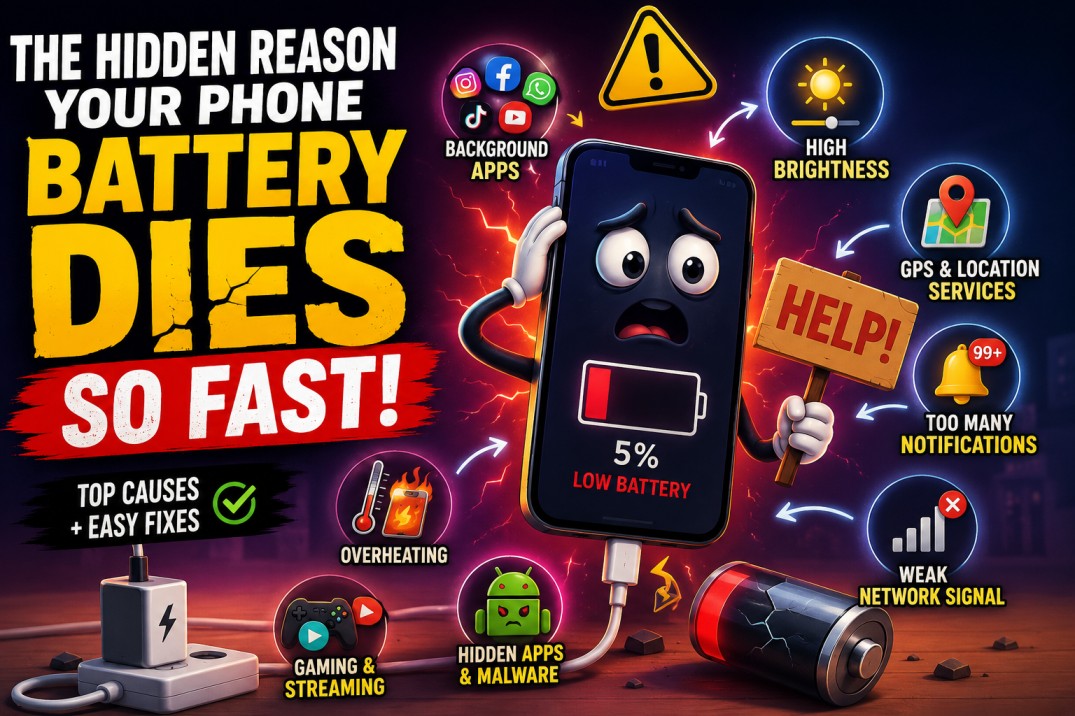
The truth is, modern phones are powerful—but they’re also constantly working in the background. Apps refresh, notifications pop up, GPS tracks your location, and your screen stays active more than you realize. All of this quietly drains your battery even when you’re not using your phone.
What makes it worse is that most people unknowingly do things that speed up the drain. So instead of blaming the phone, it’s usually small habits and hidden settings causing the issue. Once you understand them, fixing the problem becomes surprisingly easy.
Let’s break it down in a simple way so you can finally stop wondering why your phone battery dies so fast and start fixing it for good.
Hidden Technical Reasons Your Phone Battery Dies So Fast
If your phone battery dies so fast, the real problem is often happening deep inside your device where you can’t see it. These are hidden technical processes that run silently in the background all day and night. Even when your phone looks “idle,” it is actually performing dozens of tasks every second.
Understanding these hidden reasons is important because they explain why your battery drains even when you are not actively using your phone. Let’s break them down clearly.
Background Apps That Never Sleep
Even when you close apps, they don’t always stop working. Many apps are designed to stay active in the background so they can update content instantly when you reopen them.
Social media apps, messaging platforms, email clients, and even shopping apps constantly refresh data. They check for updates, sync messages, load notifications, and track user activity without you noticing.
This creates a situation where your phone is always working—even when you are not touching it.
What’s happening behind the scenes:
- Apps refresh feeds, chats, and updates continuously
- Background syncing happens every few minutes or even seconds
- Multiple apps compete for CPU, RAM, and battery power at the same time
- System resources are used even when the screen is off
Over time, this constant invisible activity becomes one of the biggest reasons your phone battery dies so fast. It feels like nothing is running, but internally, your phone is never truly resting.
Battery Aging You Don’t Notice
Every smartphone battery slowly wears out over time. This is not a defect—it’s a natural chemical process. Most lithium-ion batteries start losing efficiency after 500–800 charge cycles, which usually equals 2–3 years of regular use.
As the battery ages, it can no longer hold the same amount of charge it used to. This is why your phone might feel “fine” but still drains unusually quickly.
Even if you change nothing in your usage habits, your phone battery dies so fast simply because the battery health has declined.
Signs of battery aging:
- Battery drops suddenly from 30% to 10%
- Charging takes longer than before
- Phone heats up during normal usage
- Battery percentage behaves unpredictably
- Device shuts down before reaching 0%
In many cases, users blame apps or settings, but the real issue is simply an old battery that has lost capacity.
Weak Signal = Hidden Battery Killer
One of the most overlooked reasons your phone battery dies so fast is poor network signal. When your phone cannot find a stable connection, it automatically increases power output to stay connected.
This constant “search mode” forces your device to work harder than normal, draining the battery in the background.
You may not notice it, but your phone is constantly trying to reconnect to the nearest tower.
What causes extra drain:
- Continuous searching for nearby network towers
- Frequent switching between 4G, 5G, or weak signals
- Poor indoor coverage in buildings or basements
- High power usage during calls in low-signal areas
This is why your battery often drains faster in elevators, rural areas, or places with unstable internet.
Settings That Secretly Drain Your Battery Fast
Your Screen Is the Biggest Power Thief
Your display is one of the most powerful and energy-consuming parts of your smartphone. The brighter and smoother it is, the more battery it uses.
High brightness levels and high refresh rates (like 90Hz or 120Hz) make everything look smooth and vibrant—but they also silently drain energy all day.
If you keep brightness high constantly, it’s no surprise your phone battery dies so fast.
Battery-draining display habits:
- Using full brightness all the time
- Keeping 120Hz refresh rate enabled unnecessarily
- Leaving screen timeout too long
- Watching videos at high brightness for long periods
Even small adjustments in display settings can significantly improve battery life.
GPS That Never Stops Tracking You
Location services are extremely useful, but they are also one of the biggest hidden battery drains. Many apps use GPS even when you are not actively using them.
Social media apps tag locations, delivery apps track movement, and maps constantly update your position.
This means your phone is always working in the background to know where you are.
What drains battery here:
- Google Maps running or updating location in background
- Social media apps tracking location continuously
- Always-on GPS permissions for multiple apps
- Location-based ads and services running silently
When multiple apps access GPS at the same time, your phone battery dies so fast without any visible reason.
Too Many Notifications = Constant Wakeups
Every notification your phone receives does more than just show a message. It wakes your screen, activates system processes, and triggers background syncing.
Now imagine this happening dozens or even hundreds of times per day.
This constant “wake up and sleep” cycle quietly drains your battery.
Hidden drain sources:
- Social media alerts and likes
- Email syncing and updates
- App promotions, ads, and push notifications
- Group chats with frequent activity
Even when you are not using your phone, it is constantly reacting to incoming signals, which is another reason your phone battery dies so fast.
Apps That Make Your Phone Battery Die So Fast
Social Media: Endless Scrolling Trap
Social media apps are designed to keep you engaged for as long as possible. Auto-playing videos, infinite scrolling, and constant updates make them extremely power-hungry.
Even a quick scroll session can use more battery than you expect.
That’s why your phone battery dies so fast, even when you feel like you’re using it “lightly.”
Why they drain so much:
- Continuous video autoplay and animations
- Background data refresh every few seconds
- Heavy graphics and media loading
- Constant interaction tracking
Games & Streaming: High Power Mode Always ON
Gaming and streaming apps push your phone hardware to its maximum capacity. The processor, GPU, screen, and speakers all work together at full power.
This results in very fast battery consumption, especially during long sessions.
Big battery users include:
- PUBG Mobile, Call of Duty Mobile, Free Fire
- YouTube, Netflix, and TikTok
- High-end 3D mobile games
This is one of the fastest ways your phone battery dies so fast, especially on older devices.
Hidden Apps You Don’t Even See
Sometimes, the biggest battery drain comes from apps you don’t even notice. These could be unused apps, pre-installed system apps, or even suspicious apps running silently.
They may collect data, run ads, or perform background tasks without your awareness.
Warning signs:
- Unknown apps installed without your knowledge
- Sudden battery drops without usage
- Phone heating even when idle
- Increased data usage with no explanation
If your phone battery dies so fast without a clear reason, hidden apps are often the culprit.
Environmental Reasons Your Phone Battery Dies So Fast
Heat: The Silent Battery Killer
Heat damages battery health faster than almost anything else. Whether it’s gaming, charging, or sunlight exposure, high temperature hurts performance.
If your phone gets hot often, your phone battery dies so fast over time becomes unavoidable.
Heat sources:
- Charging while using phone
- Gaming for long hours
- Direct sunlight exposure
Cold Weather Slows Everything Down
Cold temperatures reduce battery efficiency temporarily. Your phone may look fine, but power drops faster than normal.
That’s another reason your phone battery dies so fast in winter conditions.
Real Fixes That Actually Work
Smart Settings = Instant Improvement
Small changes in settings can instantly improve battery life. You don’t need technical skills—just awareness.
Easy fixes:
- Turn on battery saver mode
- Reduce brightness
- Disable unused apps
Better Charging Habits Matter More Than You Think
Bad charging habits slowly destroy battery health. Overnight charging and overheating are the biggest mistakes.
Fixing this alone can stop your phone battery dies so fast problem long-term.
Good habits:
- Charge between 20%–80%
- Avoid overheating
- Use original charger
FAQ Section
Conclusion
If your phone battery dies so fast, it’s not just one problem—it’s a mix of habits, settings, and background activity. The good news is that most of these issues are completely fixable.
Once you start managing brightness, limiting background apps, and improving charging habits, you’ll notice a huge difference. Your phone will last longer, perform better, and finally stop dying at the worst possible moment.